Aluminum PCB Board: The Complete Guide for LED and Power Applications (2026 Update)

On This Page
Aluminum PCB Board: The Complete Guide for LED and Power Applications (2026 Update)
Aluminum PCB boards usually enter the conversation when heat starts becoming a real design constraint.
That is especially common in LED lighting, power supplies, automotive lamps, and industrial control products. In those kinds of assemblies, the board is not only expected to carry current. It also has to help move heat away from sensitive components, stay mechanically stable, and keep the product working reliably over time.
That is where aluminum PCB boards make sense.
They are often a practical choice when thermal performance matters and the circuit structure is still relatively straightforward. If the design requires dense routing, multiple signal layers, or high layout flexibility, standard FR-4 may still be the better option.
So the decision is rarely just aluminum or FR-4. In real projects, it usually comes down to thermal targets, dielectric performance, layout demands, manufacturing constraints, and what needs to be confirmed before prototype or production begins.
This guide explains what an aluminum PCB board is, how it is built, how it compares with FR-4, where it is commonly used, what actually affects thermal performance, and what buyers and engineers should check before moving into quotation, sampling, or mass production.
About This Guide
This article is written for buyers, engineers, product teams, and sourcing managers who need a practical understanding of aluminum PCB boards.
It is not meant to be a purely academic review of materials. The goal is more practical than that: to answer the questions that usually come up when a team is comparing board options, preparing prototypes, or trying to avoid thermal and manufacturing problems later.
Typical questions include:
- When is an aluminum PCB board a better choice than FR-4?
- What really affects thermal performance?
- What trade-offs come with cost, routing flexibility, and manufacturability?
- What should be confirmed before requesting samples or moving into production?
The focus here is on common aluminum PCB structures, especially single-sided boards used in LED lighting and power electronics, because that is where most day-to-day demand sits.
1. What Is an Aluminum PCB Board?
An aluminum PCB board is a type of metal core printed circuit board that uses an aluminum base as its structural and thermal foundation.
Instead of relying on a fiberglass substrate like standard FR-4, it uses a metal-backed construction to improve heat dissipation and increase rigidity. That makes it useful in products where temperature control is not a secondary detail, but part of whether the product performs reliably at all.
You may also see related terms such as:
- aluminum core PCB
- metal core PCB
- MCPCB
- insulated metal substrate (IMS)
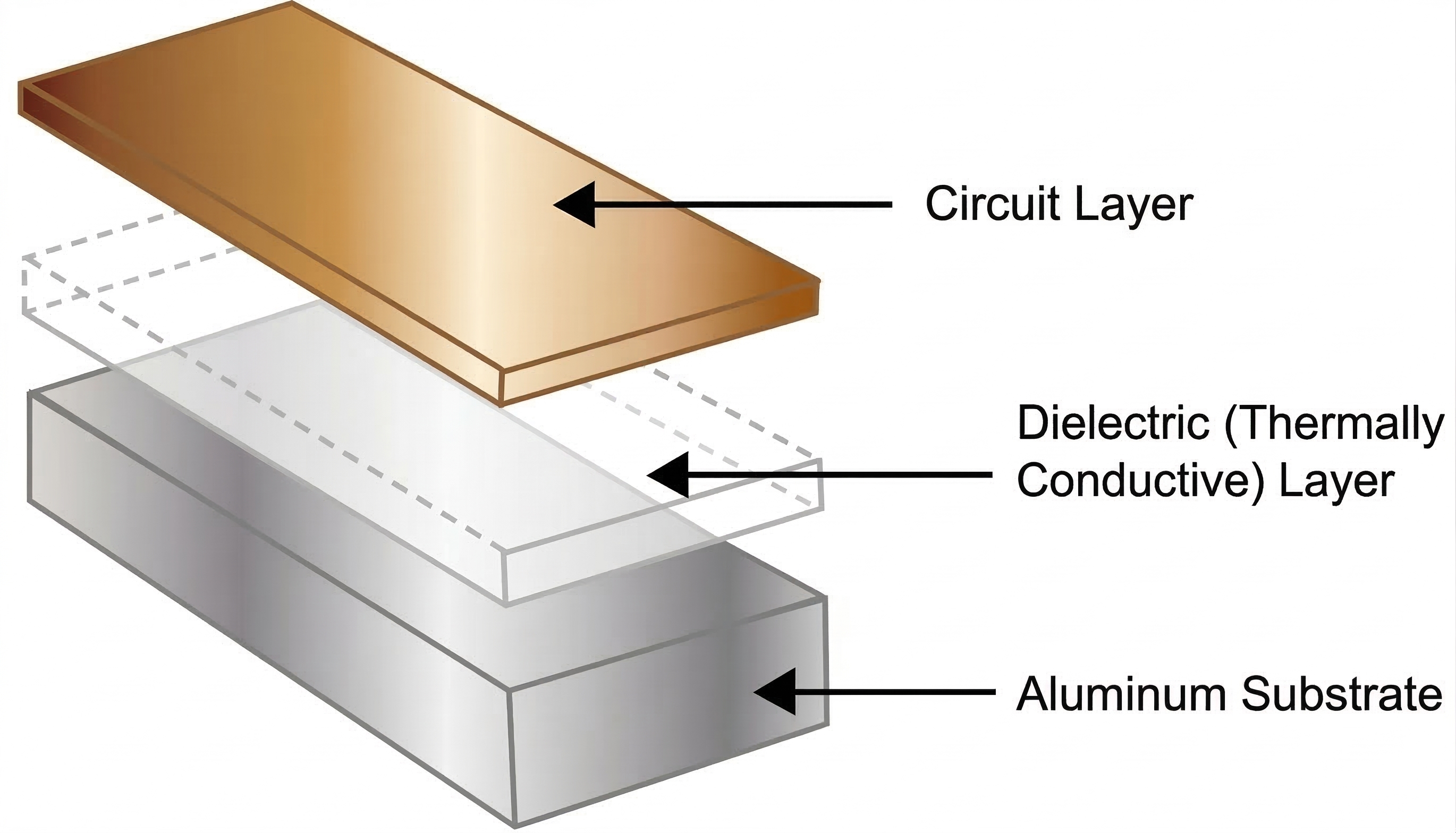
In most engineering and sourcing discussions, these terms point to the same basic structure: a copper circuit layer on top, a thermally conductive dielectric layer in the middle, and an aluminum base underneath.
Why does that matter?
Because some products generate enough heat that the board stops being only an electrical platform. It becomes part of the thermal path.
That is common in designs using:
- high-power LEDs
- power resistors
- MOSFETs
- rectifiers
- driver circuits
- power conversion components
If that heat is not handled properly, the result is usually easy to see. Operating temperature rises, output becomes less stable, lifetime may drop, and failure risk increases.
That is why aluminum PCB boards are widely used in:
- LED bulbs, panel lights, and downlights
- street lights and outdoor lighting systems
- power supplies and converters
- automotive lighting
- motor drivers
- industrial control products
At the same time, aluminum PCB boards should not be treated as a universal upgrade over FR-4. They are usually the right fit when heat matters and the circuit is not overly complex. If the design needs dense routing, multilayer interconnection, or complex via structures, FR-4 is often still the more practical choice.
So the real point is not that aluminum PCB boards are better in every case. It is that they are better suited to products where heat and reliability shape the design from the start.
2. How an Aluminum PCB Board Is Built

A typical aluminum PCB board is made up of three main functional layers:
- the copper circuit layer
- the dielectric insulation layer
- the aluminum base
Each layer has a different job. The final performance of the board depends on how those layers work together, not on the aluminum alone.
Copper Circuit Layer
The top copper layer forms the traces, pads, and electrical connections, much like it does on a standard PCB.
Depending on the application, this layer may use standard 1 oz copper or heavier copper if the design needs higher current carrying capacity or better lateral heat spreading. Thicker copper can help distribute heat across the board surface, but it is only one part of the thermal picture.
That is worth remembering because teams sometimes assume that more copper automatically solves thermal problems. It helps, but it does not replace a good downward thermal path into the substrate.
Dielectric Insulation Layer
This is often the most overlooked part of the board, and in many real projects it turns out to be the most important one.
The dielectric sits between the copper layer and the aluminum base. It has to do two jobs at the same time:
- provide electrical insulation
- allow heat to pass through
That balance is what makes aluminum PCB design different from simply attaching copper to metal.
In practice, this layer is often the thermal bottleneck. Aluminum itself conducts heat well, but the total thermal performance of the board depends heavily on the dielectric thickness, thermal conductivity, breakdown strength, and long-term stability.
That is why two aluminum PCB boards with similar aluminum thickness can perform very differently in the same product. Buyers often focus on the aluminum base first because it is the most visible part of the stack. In actual thermal discussions, the dielectric often matters more.
Aluminum Base Layer
The aluminum base gives the board structural support and acts as a heat spreader.
It helps move heat away from concentrated hot spots and distribute it across a larger area. It also increases stiffness, which can be valuable in larger boards, outdoor lighting products, and applications exposed to vibration or repeated thermal cycling.
For many LED lighting products, that extra rigidity is not just a bonus. It is one of the reasons aluminum PCB boards make practical sense in the first place.
Surface Protection and Rear Treatment
Depending on the application, the rear side of the aluminum base may include protective coating or treatment to improve corrosion resistance and durability.
This matters more in outdoor or industrial environments, where handling, mounting conditions, and long-term exposure can affect overall reliability.
The key takeaway is simple: the performance of an aluminum PCB board does not come from aluminum alone. It comes from the copper layout, dielectric design, and base structure working together as one system.
3. Aluminum PCB Board vs FR-4

This is one of the most common questions in both engineering and sourcing discussions.
At a high level, FR-4 is the more general-purpose board material. Aluminum PCB boards are usually selected when thermal management becomes an actual design requirement rather than a secondary consideration.
But the difference is not only about heat. It also affects routing flexibility, insulation strategy, cost, mechanical behavior, and manufacturing choices.
If you want a shorter side-by-side breakdown focused specifically on the material comparison, read Aluminum PCB vs FR4 PCB: What's the Difference?.
In most real projects, this is not a theoretical material debate. It is a decision about what the product needs more: thermal performance or routing flexibility.
| Comparison Point | Aluminum PCB Board | FR-4 Board |
|---|---|---|
| Heat dissipation | Stronger thermal path, better for heat-intensive applications | Lower thermal performance, often needs added thermal support |
| Mechanical stability | Higher rigidity and structural support | More general-purpose, but usually less rigid |
| Routing flexibility | More limited, especially in standard single-sided structures | Better for multilayer and signal-dense designs |
| Electrical insulation | Depends on the dielectric layer between copper and aluminum | Base material itself is insulating |
| Typical cost | Usually higher | Usually lower |
| Typical applications | LED lighting, power modules, automotive lamps, industrial controls | General electronics, digital circuits, multilayer control boards |
Thermal Performance
If heat is one of the main constraints in the product, aluminum PCB boards usually have a clear advantage.
They provide a more direct thermal path away from hot components, which can help reduce operating temperature and improve long-term reliability. In LED applications, this matters because temperature directly affects luminous performance, color stability, and service life.
That is one reason aluminum PCB boards are so common in lighting. The thermal benefit is not abstract. It shows up in how the product behaves over time.
Mechanical Stability
Compared with FR-4, aluminum PCB boards are often more rigid and structurally stable.
That makes them a strong fit for larger-format boards, outdoor lighting assemblies, automotive lamps, and products exposed to vibration or repeated thermal stress. In these cases, the mechanical strength of the board is part of the value, not just an added feature.
Electrical Insulation
FR-4 is inherently insulating. Aluminum is not.
That means insulation in an aluminum PCB board depends heavily on the dielectric layer between the copper and the metal base. In low- to medium-voltage designs, this is usually manageable with the right material system. In products with stricter insulation requirements, dielectric selection becomes much more critical.
This is one reason casual comparisons can be misleading. The question is not simply whether aluminum conducts heat better. The question is whether the full material stack supports the electrical and thermal demands of the product at the same time.
Design Flexibility
This is where FR-4 still has a major advantage.
FR-4 is better suited to multilayer routing, dense signal layouts, complex interconnections, and designs where routing freedom matters more than heat dissipation through the board.
Aluminum PCB boards are often a better fit for simpler, thermally demanding circuits rather than signal-heavy digital boards.
So the comparison should not be framed as aluminum versus FR-4 in the abstract. The better question is:
What does the product need more right now: thermal performance or routing flexibility?
That is usually where the right answer begins.
4. Where Aluminum PCB Boards Are Commonly Used

Not every aluminum PCB board is built the same way, but the most common use cases are fairly consistent.
Single-sided aluminum PCB boards are still the most practical and widely used structure for many projects. Components are mounted on the top copper layer, while the aluminum base underneath helps spread heat and support the board mechanically.
For LED lighting and many power-related applications, this structure offers a strong balance of thermal performance, manufacturability, and cost.
Typical applications include:
- LED bulbs and panel lights
- downlights and spotlights
- street lights and outdoor fixtures
- power conversion modules
- automotive headlights and signal lamps
- motor control assemblies
- industrial driver boards
More complex aluminum-based constructions do exist, including double-layer, multilayer, and hybrid structures. These can make sense in certain products, but they are more specialized and not always the best place to start.
In many real projects, especially at the prototype stage, the simplest structure that can meet the thermal and electrical requirements is usually the most practical one.
LED lighting remains one of the clearest use cases. LEDs are highly sensitive to temperature, and thermal problems tend to show up quickly in reduced lifetime, color shift, or unstable output. That is why aluminum PCB boards are so often treated as a practical answer rather than a niche material choice.
5. Main Advantages and Limitations
Aluminum PCB boards solve real thermal and structural problems, but they also introduce their own constraints.
A balanced view is more useful than simply listing benefits.
Main Advantages
Better Heat Dissipation
This is still the main reason to choose an aluminum PCB board.
Lower operating temperature can improve reliability, extend service life, and support more stable product performance. In LED and power products, that can directly affect whether the final system performs as intended over time.
Stronger Mechanical Support
The aluminum base adds stiffness and helps the board maintain its shape, especially in larger assemblies or demanding environments.
This matters in products where the PCB contributes to structural stability as well as electrical function.
A More Compact Thermal System
Because the board itself helps spread heat, some designs can reduce reliance on oversized heat sinks or bulky supporting structures.
That does not mean external thermal management disappears, but it can simplify the overall thermal approach.
Well Suited to LED and Power Applications
When the thermal load is meaningful and the circuit is not overly complex, aluminum PCB boards often offer a practical solution.
That is why they continue to be widely used in lighting, drivers, converters, and related assemblies.
Main Limitations
Higher Material and Processing Cost
Compared with standard FR-4, aluminum PCB boards are usually more expensive.
That increase comes from both the material system and the process requirements involved in building the board.
Less Routing Freedom
They are not the best fit for highly complex multilayer layouts or signal-dense products.
If the circuit design needs a lot of routing flexibility, aluminum may create more constraints than benefits.
More Demanding Assembly and Rework
Because the board transfers heat efficiently, soldering behavior can become more demanding.
That often means reflow profiles, hand soldering, and rework conditions need closer control than teams expect at first.
More Attention to Insulation and Spacing
Since the base material is conductive metal, insulation, creepage, and clearance deserve more attention.
This is not necessarily a problem, but it is not something to treat casually either.
So yes, aluminum PCB boards offer real value. But that value only shows up when the product's priorities match what the board does well.
6. What Actually Affects Thermal Performance
A common mistake in early project discussions is to assume that aluminum thickness alone determines thermal performance.
It usually does not.
In many practical applications, the dielectric layer has a greater effect on thermal resistance than the base thickness itself. Dielectric thickness, thermal conductivity, and long-term material stability all matter. A thinner dielectric may improve heat transfer, but it still has to meet insulation and reliability requirements.
In many real LED and power projects, the dielectric layer has more influence on thermal resistance than the aluminum thickness people ask about first.
The best option is not always the thinnest or highest-spec material on paper. It has to fit the actual electrical, thermal, and product-life demands of the project.
Layout matters too.
Component placement, copper area, thermal pad design, and the way heat spreads across the board can all influence the final result. In LED boards, for example, the layout under each LED package can make a noticeable difference in how effectively heat moves into the substrate.
And the board itself is only part of the thermal system.
If it will be mounted to a housing, heat sink, or structural base, then flatness, thermal interface materials, pressure distribution, and contact quality also become part of the real thermal path.
This is why thermal discussions should not stop at the board stack. Good thermal performance comes from the board, the layout, and the final product structure working together.
7. Design Guidelines That Matter in Real Projects
A good aluminum PCB design does not begin with board thickness alone. It begins with the thermal target.
That sounds obvious, but in real projects many mistakes start when teams treat aluminum PCB boards as if they were simply FR-4 boards with a metal back.
They are not.
Prototype issues often come from treating aluminum PCB like a simple material swap, when the real change is in thermal path, insulation, and assembly behavior.
Start with Thermal Requirements
Before choosing materials, define the target clearly.
- How much heat will the product generate?
- What temperature rise is acceptable?
- What does the operating environment look like?
- Is there airflow, enclosure confinement, or outdoor exposure?
Without those answers, choosing the right dielectric, copper thickness, or base structure becomes guesswork.
Choose the Dielectric Carefully
This layer is central to performance.
In many LED and power projects, teams focus first on aluminum thickness and copper weight while the dielectric gets confirmed later. That often leads to extra back-and-forth during quotation or sample review.
The dielectric is not a background detail. It is one of the first things worth checking.
Pay Attention to Component Placement
Heat-generating components should be placed with the thermal path in mind.
That is especially true in LED boards, where the area under the package and the copper distribution nearby can directly affect heat movement into the board.
Use Copper for More Than Conductivity
Copper layout affects current carrying capacity, but it also influences lateral heat spreading.
Large copper areas and well-designed thermal pads can help reduce hot spots and improve temperature uniformity across the board.
Think About Mounting Early
The board is only one part of the final thermal system.
If it will be mounted to a housing or heat sink, then interface materials, flatness, mounting holes, and pressure distribution should be considered early, not after the board stack is already fixed.
In prototype-stage projects, this is one of the most common sources of avoidable iteration. The board may look acceptable on paper, but the final assembly path is not ready to support it properly.
8. How Aluminum PCB Boards Are Manufactured

The manufacturing flow of an aluminum PCB board shares some steps with standard PCB production, but the metal-core structure adds its own process demands.
That is why manufacturing quality has a direct effect on final thermal and mechanical performance.
Material Preparation
Production starts with selecting the aluminum base, dielectric material, and copper foil.
These choices depend on thickness targets, thermal requirements, electrical constraints, and the application environment.
Lamination
The dielectric and copper layer are bonded to the aluminum base under heat and pressure.
This is one of the most important stages in the process. Lamination quality affects thermal transfer, bonding strength, and long-term reliability. If this step is unstable, the board may still look acceptable while performing inconsistently in service.
Imaging and Etching
Once the panel is built, the copper layer is patterned into the required circuit through standard imaging and etching processes.
Drilling, Routing, and Mechanical Processing
Mounting holes, slots, outlines, and cutouts are processed at this stage.
Because metal is part of the structure, machining quality matters a great deal. Burr control, dimensional accuracy, handling discipline, and surface condition can all affect the final result.
Solder Mask, Surface Finish, and Inspection
After the circuit is formed, the board receives solder mask and surface finish, followed by electrical testing and final inspection.
In lighting applications, white solder mask is often selected because it helps with light reflectivity. That makes sense in many LED products, but it should still be chosen as part of the application requirement rather than treated as an automatic default in every case.
Looking at the process this way makes one thing clear: the quality of an aluminum PCB board is not defined by datasheet numbers alone. It also depends on stable lamination, controlled machining, and consistent manufacturing execution.
9. What Affects Cost and How to Choose the Right Board
The cost of an aluminum PCB board is shaped by much more than board size.
In real sourcing work, pricing is usually affected by:
- aluminum base thickness
- copper thickness
- dielectric type and thermal performance
- dielectric thickness
- board shape and machining complexity
- surface finish
- order quantity
- lead time
| Cost Factor | Effect on Cost | Why It Matters |
|---|---|---|
| Aluminum base thickness | Thicker material usually increases cost | Affects stiffness, heat spreading, and assembly needs |
| Copper thickness | Heavier copper usually costs more | Influences current capacity and lateral heat distribution |
| Dielectric thermal performance | Higher-performance systems are usually more expensive | Directly affects thermal resistance and temperature rise |
| Dielectric thickness | Changes both material cost and process requirements | Affects insulation and heat transfer balance |
| Board shape and machining complexity | Slots, unusual outlines, and special holes increase cost | Impacts manufacturability and lead time |
| Surface finish | Different finishes carry different costs | Affects solderability, durability, and appearance |
| Order quantity | Larger quantities usually reduce unit cost | Important for budgeting and sourcing strategy |
| Lead time | Urgent production often costs more | Affects project planning and sample schedules |
Higher-performance dielectric systems usually cost more. So do heavier copper, unusual outlines, complex cutouts, urgent builds, and tighter process requirements.
That said, cost should always be judged in context.
If the product generates meaningful heat, uses high-power LEDs, or depends on long-term thermal stability, the added cost of aluminum is often justified. Better thermal control can improve product lifetime, reduce failures, and simplify the overall thermal design.
On the other hand, if the design is low-power, highly routing-driven, or extremely cost-sensitive, FR-4 may still be the better choice.
The useful question is not what is the highest specification available. It is what structure actually fits the product without overbuilding it.
Aluminum vs Copper Core
Copper-core boards can offer stronger thermal performance, but they are also heavier and more expensive.
For many LED and medium-power applications, aluminum provides a more balanced combination of cost, performance, and manufacturability.
10. What to Confirm Before Ordering Samples or Production
Before moving into quotation, sampling, or mass production, it helps to confirm the basics clearly.
A practical checklist includes:
- application type
- board thickness
- copper weight
- dielectric thermal conductivity
- dielectric thickness
- surface finish
- solder mask color
- machining tolerance
- estimated quantity
- sample lead time
- mass production lead time
- drawings or Gerber files
If SMT assembly is part of the project, that should be discussed early as well. Material stack, thermal design, and assembly conditions are easier to align when they are reviewed together instead of being treated as separate issues.
The earlier these details are aligned, the easier it is to avoid delays during quotation, sampling, and later production review.
In real prototype work, that early alignment often saves more time than teams expect.
Common Mistakes Teams Make When Choosing Aluminum PCB Boards
Even when teams know they need better heat dissipation, a few mistakes appear again and again.
One common mistake is focusing on aluminum thickness too early while leaving the dielectric specification vague. That often leads to oversimplified comparisons and unnecessary revision later.
Another is treating aluminum PCB as a simple replacement for FR-4 without rethinking the thermal path, mounting method, and assembly conditions. The board material changes, but the rest of the design logic often has to change with it.
Some teams also review the board stack and the assembly plan separately. In prototype-stage projects, that can create delays because soldering behavior, thermal transfer, and board handling are all connected.
And finally, there is the assumption that a board that looks fine in a file review will automatically perform well in the finished product. In many cases, the real thermal result depends just as much on mounting flatness, interface materials, and system-level heat flow as it does on the board itself.
Conclusion
Aluminum PCB boards are one of the most practical options for products that need stronger heat dissipation than standard FR-4 can comfortably provide.
That is why they are widely used in LED lighting, power modules, automotive lamps, and other applications where heat directly affects product reliability and service life.
Their value is especially clear when the design needs three things at once:
- better thermal performance
- stronger mechanical support
- a board structure that remains relatively straightforward to manufacture
At the same time, aluminum PCB boards are not a universal solution. They make the most sense when the design is thermally demanding but not overly complex from a routing standpoint.
For many projects, the real decision comes down to a simple question:
How much of the product's long-term performance depends on controlling heat effectively?
If the answer is a lot, then aluminum PCB boards are usually worth serious consideration early, before prototype decisions turn into production limitations.
If you are evaluating an LED or power project, it helps to confirm the board stack, copper weight, thermal requirements, and expected quantity before moving into quotation or sampling. That usually makes it easier to choose a board structure that fits both the thermal target and the manufacturing plan.
Join Our Industrial Community
Get exclusive technical whitepapers and industry news delivered to your inbox every month. No spam, only professional insights.